
People today expect quick, smooth service without standing in long queues. Meta Kuwait Login Portal was created to meet this need by offering a simple online appointment system. It allows residents to manage important tasks such as Civil ID services, family visit visas, and biometric registration directly from their home.
The portal connects multiple government offices on one platform. Users can select a service, choose a suitable time, and confirm their appointment in minutes. Once booked, you only need to visit the office at your scheduled time. This saves effort, reduces crowding, and makes government services more organized and efficient.
Meta Kuwait Online Registration
To access services on Meta Kuwait, creating an account is the first step. This process helps protect your information and allows the system to confirm your identity using your Civil ID. After completing registration, you can easily schedule appointments for different government services in Kuwait.
Information needed to create a new Meta account:
- Active email address
- Civil ID number
- Valid mobile number
How To Register In The Meta Kuwait Portal New Registration App Account
Registering on the Meta Portal in Kuwait allows residents to access government services online with ease. The new registration process is simple and helps you book appointments without visiting offices.
Steps to Create an Account on Meta Kuwait
Step 1: Open the official portal
Open your web browser and visit meta.e.gov.kw.
Step 2: Start registration
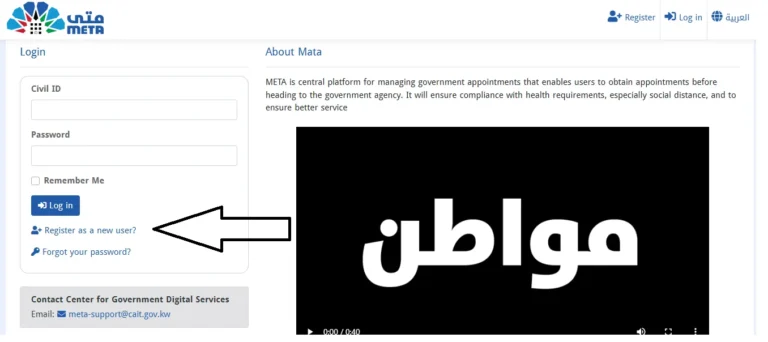
On the homepage, click on Register as a New User to begin.
Step 3: Add your details
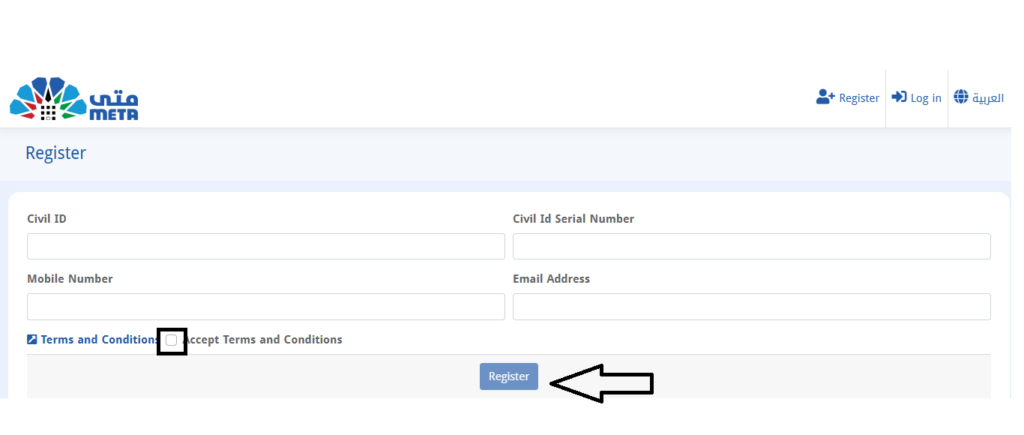
Enter your Civil ID number, the serial number printed on the back of your Civil ID, your mobile number, and a valid email address.
Step 4: Accept the terms
Read the terms of use carefully and tick the checkbox to agree.
Step 5: Submit your request
Click the Register button to send your information to the system.
Step 6: Verify your email
Check your email inbox for a message from Meta Kuwait. Open it and click the verification link.
Step 7: Set your password
Create a strong password to secure your account.
Once these steps are completed, your Meta Kuwait account will be ready to use. You can log in anytime and start booking government service appointments.
Meta Kuwait Online Appointment Booking
One of the main benefits of using Meta Kuwait is the ability to plan your government visit in advance. You can arrange an appointment online and visit the office only at your selected time, which saves effort and avoids unnecessary waiting.
How To Login To Meta Kuwait Portal
Meta Kuwait Portal Login allows users to securely access government services online and manage their appointments with ease.
- Click to open the link: https://meta.e.gov.kw/
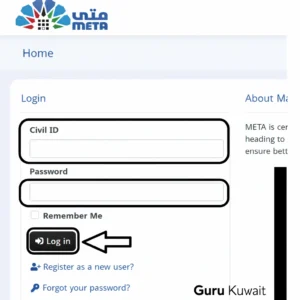
- Enter your Civil Id Number & Password.
- Click on the Login Button.
- Enter your Civil ID number and password in the login fields.
Meta Kuwait Login Issues – Quick Fixes
If you are unable to log in, try these simple steps:
- Check that your Civil ID and password are entered correctly
- Check that your internet connection is working properly
- Use a modern browser such as Chrome, Edge, or Firefox
- Clear the browser cache and cookies if the page does not load
If the problem continues, reset your password using the Forgot Password option or contact Meta Kuwait support for help.
How To Book An Appointment On Meta Kuwait Portal
- Sign in to your Meta Kuwait account using your Civil ID no and password.
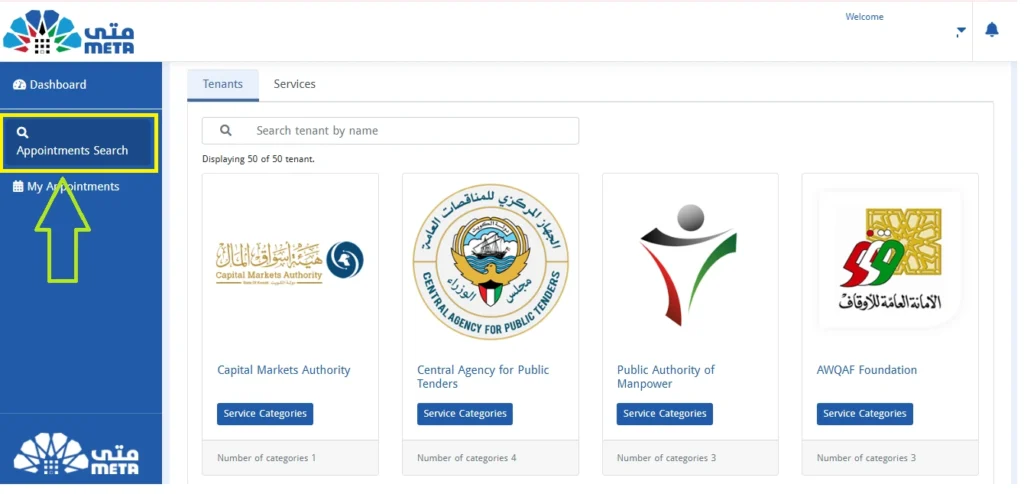
- Click on the Appointments Search option as you can check below.
- Select the Government Ministry that matches your requirement.
- Choose the relevant Department and the Service from the list.
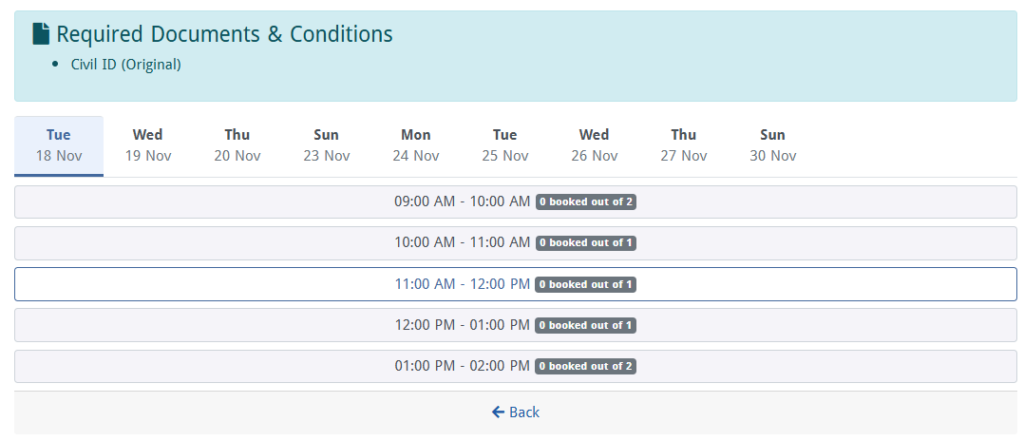
- Continue by selecting an available Date and Time that suits your schedule.
- Confirm your request to complete the booking.
- Keep your appointment reference or confirmation message for your visit.
How To Modify Or Cancel Appointment Online Meta Kuwait
Once your appointment is confirmed, you should visit the chosen government office on the scheduled day and time. If something comes up and you cannot attend, Meta Kuwait allows you to manage your booking online without any trouble.
Change or Cancel Your Meta Kuwait Online Appointment
- Sign in to your Meta Kuwait account.
- Open the My Appointments section from your dashboard.
- Select the booking you want to update.
- Use the option next to the appointment to cancel it and confirm.
- If you need a new slot, return to the booking area and choose another date and time.
Avoid skipping appointments without notice, as this can limit future booking options.
Services You Can Schedule Online
Meta Kuwait supports appointments for many government needs, including:
- Civil ID-related tasks
- Biometric enrollment
- Traffic and driving services
- Residency and immigration matters
- Medical and health-related visits
- Visa-related services
All departments follow a similar booking process, making the system simple, organized, and user-friendly across ministries.
How To Reset Meta Kuwait Login Forgot Password
Forgetting your password is normal, and Meta Kuwait makes recovery easy. Just follow these steps to regain access to your account:
- Visit https://metadrapp.azurewebsites.net/ using a secure browser.
- Click on Forgot Your Password on the login screen.
- Enter your Civil ID number and submit the request.
- Check your registered email inbox (also check spam/junk folder).
- Open the reset email, click the link, and create a new strong password.
Extra tips to avoid future issues:
- Use a password you can remember, but others can’t guess.
- Avoid using public Wi-Fi while resetting your password.
- Save your new password in a secure place or password manager.
If you still cannot log in after resetting, contact Meta Kuwait Support for help:
Email: [email protected]
Their support team can guide you further and help unlock your account if needed.
How to Unlock Meta Kuwait Locked Account
If your Meta Kuwait account gets locked due to repeated incorrect login attempts, don’t worry. You can regain access by following one of the methods below.
Method 1: Review Security Notifications
If you can still access your account, open the admin or settings area and check the security notifications. Look for the option to unlock your account and follow the steps shown on the screen.
Method 2: Create a New Password
Go to the login page and choose the password recovery option. Set a new password and then try signing in again using the updated details.
Method 3: Get Help from Meta Kuwait Support
If self-recovery does not work, contact the support team directly.
- Phone: 164 or 1800 164
- Email: [email protected]
Be ready to share your Civil ID and explain the problem. The support team will guide you through unlocking your account.
How to book a biometric appointment in Meta?
Log in to your Meta Kuwait account, open Appointments Search, select the Ministry of Interior, choose Biometric Enrollment, pick a location and time, and confirm your appointment.
How to take an appointment for biometrics in Meta Kuwait?
Open Appointments Search, select Ministry of Interior, choose Biometric Enrollment, pick your branch, date, and time, then confirm the appointment.
Conclusion
Meta Kuwait makes booking government appointments simple and time-saving. The online system removes long waiting times at offices. Users can manage biometric, visa, and other services with ease. Appointments are scheduled in advance for better planning. Overall, Meta Kuwait offers a smooth and efficient experience for residents.